
Course Work BY R. A. Chaproniere
Navigation
HOMEPAGE
COURSES
 Exploring the Universe
Thu' a Small Telescope
Thu' a Large Telescope
Galaxies
Planetary Atmospheres
Planetary Geology
Modern Cosmology
Stars
Science Fiction???
PROJECTS
Essays
Observational Work
ABOUT ME
CONTACT ME 
Data Source :
Star data from the Stars web-site Graphic from the Astralia telescope web-site
Advertisement
 Hubble Reborn takes the reader on a journey through the Universe with spectacular full-colour pictures of galaxies, nebulae, planets and stars as seen through Hubble's eyes, along the way telling the dramatic story of the space telescope, including interviews with key scientists and astronauts.
Astonomy Now

Advertisement
John Moores University offers exciting distance learning courses in Astronomy ranging from an Introduction to Astronomy to Planetary Geology . You are sure to find something that interests you and want to know more about. If, like me, you've a lifelong interest in the subject or have been overwhelmed by the sheer beauty of the heavens then this is the place to start.
John Moores University
Assignment 4 (Energy Flow from the Sun)

To See Other Assignments in the Exploring the Universe Series: | 1 | 2 | 3 | 4 | 5 | 6 | 7 | 8 | 9 | 10 | 11 | 12 |
Energy Flow from the Sun
The following assignment was done using software simulation.
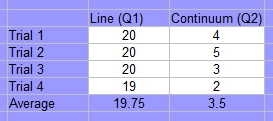 Choose line photons and click on the run button to watch, as many photons are sent from the left of the screen to pass through or interact with the atoms. Click on the stop button after 20 photons are sent.
Q 1) How many line photons were scattered? Q 2) How many continuum photons were scattered?
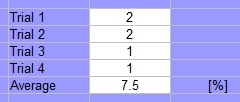
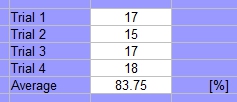
Q 3) Select Number of Line Photons (for "Run") from the Parameters menu and enter 20. Click on the
Run button to send them through the cloud. Of the 20, what percentage were
detected? Q 4) Send 20 Continuum photons through the cloud, as you did in Exercise 2. Of the 20, what percentage were detected?
Q 5 ) Choose a gas by selecting Select Gas Atoms and the gas from the Parameters menu. Enter the name of the gas in Table 1. Select Change Photon Energy from the Parameters menu to set the photon energy to 1.5 eV. As you change the photon energy, the wavelength (the colour) changes automatically since the two are related. You can reset the counters and statistics using the Reset button. Be sure to reset the counters if you switch to a new gas or a different energy level.
Pages
<< | 1 | 2 | 3 | 4 | 5 | 6 | 7 | 8 | Next | >>
To dowload a PDF version of this assignment click here